Currently, online learning is a method widely adopted by many schools to prevent the spread of Covid-19. As a result, numerous online learning platforms have been developed to meet the needs of students. Ninequiz is an online learning and testing software that is quite popular and widely used. How can you effectively manage online classes with Ninequiz? Let’s find out through the information below.
An overview of online learning software
Online learning software is a platform that provides learning materials for learners, allowing them to easily attend classes from home. Users can use the software to participate in various classroom activities such as: class management, building a resource library, registering for courses, joining online courses, receiving tests, etc.
Benefits of online learning software
- Flexible choice of learning environment: With online learning, users can join classes from anywhere as long as they have an internet connection. This allows learners to freely choose their place and environment for study, saving travel time.
- Flexible study schedule: With devices such as personal computers, laptops, smartphones, tablets, etc. connected to the internet, both teachers and learners can choose a study time that suits them.
- Cost savings: Online learning helps save many costs such as infrastructure, travel, etc. Both teachers and learners do not have to spend much time and effort commuting. Using online learning software can help users save 20–40% of their time compared to traditional learning methods.
- High flexibility: While studying, students can use the software’s library to enhance their knowledge, take multiple courses at once, and monitor their own progress. Online learning software can also be flexibly selected. Among them, Ninequiz is one of the most popular online learning and classroom management software.
- Making lessons more engaging: In addition to regular teaching, instructors can add images, videos, and audio to their lessons to make them more lively and help learners absorb knowledge more easily.
How to easily create and manage online classes with Ninequiz
To create an online class on Ninequiz, teachers should follow these steps:
- Step 1: Go to https://ninequiz.com
- Step 2: Log in with your Gmail or registered account
- Step 3: Select the teacher interface
- Step 4: Click on the "Class" section
- Step 5: Click "Create class"
- Step 6: Enter the class name and a brief description (if any)
- Step 7: Click "Add" to complete
- Step 8: After successfully creating the class, click the "+" icon and enter the email to add students to the class
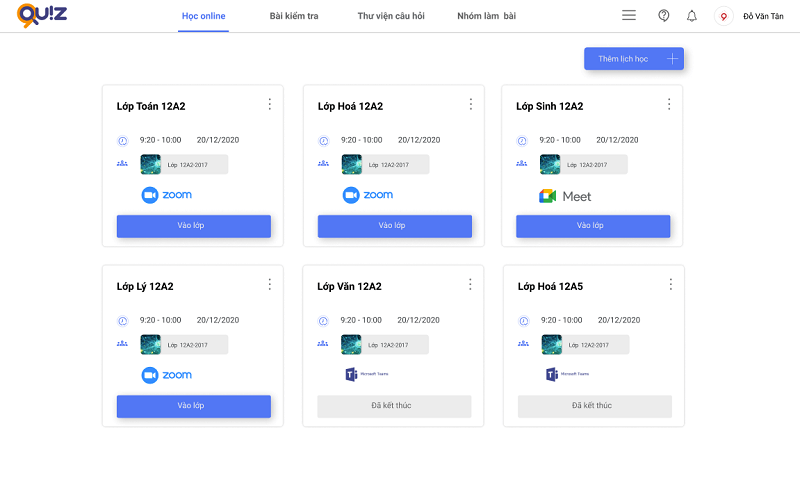
Online class on Ninequiz
Related articles
Transforming School Governance from Experience-Based to Data-Driven
Solutions to Improve Training Quality for Tutoring Centers and Freelance Teachers
