The digital technology boom has brought many practical benefits to life. One of the most useful tools is creating online multiple-choice questions, helping teachers and students optimize the teaching and learning process. Not only does it save time and effort, but online platforms also offer outstanding advantages, making management easier and improving teaching quality. Let’s explore how to create simple and effective online multiple-choice questions to enhance your work experience.
The importance of creating online multiple-choice questions
Technology is increasingly being applied in social life, bringing convenience and shortening working time, especially in teaching and test creation. Below are four advantages of creating online multiple-choice questions.
- Shorten test creation time: Teachers no longer have to manually create and shuffle test papers; the system will automatically generate a unique set of questions for each student without duplication, and results will be displayed on the screen after completion.
- Cost savings: This is one of the most prominent advantages of online multiple-choice testing. When conducting online tests, schools do not need to hire graders or rent lecture halls, saving costs that can instead be invested in upgrading equipment. Shortening the preparation time for an exam also helps reduce costs significantly.
- Improved education quality: Taking tests on the system helps prevent cheating, as it is easy to alter answers on paper. With online question creation, you can be assured that each test will accurately reflect each individual's abilities.
- Wider coverage of knowledge: Test questions on the system are a compilation of the curriculum and are distributed randomly. Therefore, questions are rarely duplicated, encouraging students to study diligently and strategize to achieve high scores instead of selective studying.

Online multiple-choice testing is highly applicable nowadays
Introduction to Ninequiz forms
Ninequiz is software founded by Vietnamese people, featuring a user-friendly interface and entirely in Vietnamese, making it easy to use. The software allows you to create online multiple-choice questions, manage class participation, and helps teachers access and use it effectively.
Outstanding features:
- Create and manage classes
- Manage class schedules
- Manage test libraries
- Create tests
How to create a form on Ninequiz
Currently, Ninequiz is popular and favored for its simple steps to register, create online multiple-choice questions, and log in to use. Creating a form on Ninequiz software only takes a few simple steps:
Log in or register an account
- Step 1: Select login if you already have an account or register if you do not after accessing the following link ninequiz.com. Once successful, go to the homepage and select “For teachers”.
- Step 2: Next, from the quiz management interface, select create test and proceed to make your test.
Enter necessary information
- To create a satisfactory set of questions, enter a title such as: “Grade 6 Natural Science Multiple-Choice Questions - Knowledge Connection”.
- Below the title is the “short description of the test” section, which you can leave blank.
Create multiple-choice questions by uploading an existing file
If you already have prepared questions in Excel or another file, upload them to Ninequiz by following these steps:
- Step 1: From the add question toolbar, select the “Upload” feature.
- Step 2: Next, upload the file containing your list of multiple-choice questions. If you cannot upload your questions, download the sample file, edit it as required, and re-upload.
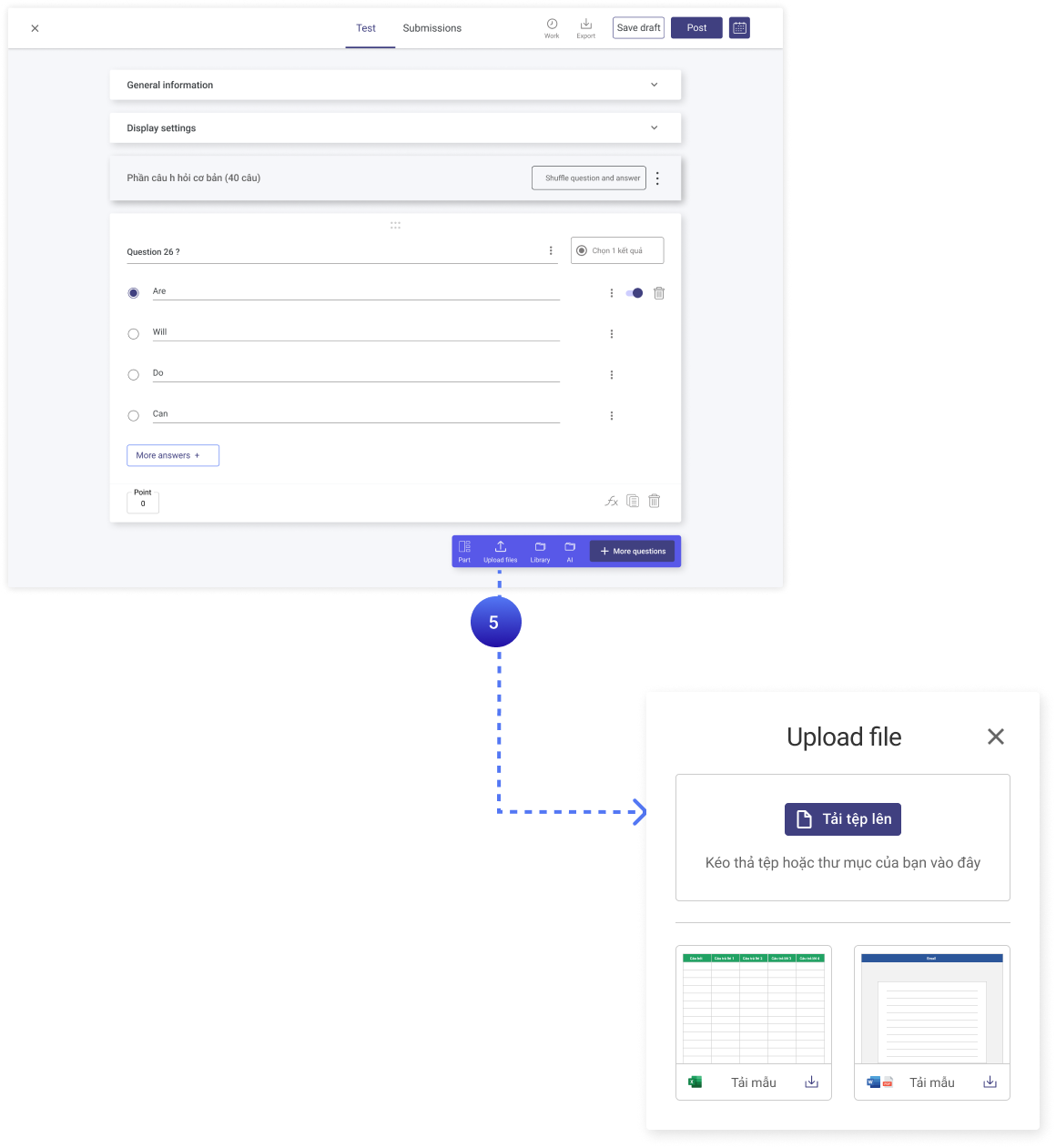
Create available online multiple-choice questions
Manually add multiple-choice questions
If you do not have pre-made questions, you need to manually create online multiple-choice questions:
- Step 1: In the new multiple-choice question form, enter the question and answers.
- Step 2: Select the correct answer for the question provided.
- Step 3: To create the next question, click the add question button.
Publish the test
Next, publish your test and share the questions you have prepared as follows:
- Step 1: On the software interface, click the “publish” button in the top right corner to post your test. After publishing, the screen will display it in the “test list, ongoing groups”.
- Step 2: To share your post, return to the “test list” screen and click the “action” button.
- Step 3: Finally, copy the link from the sharing screen and send it to the students who need to take the test. Your students simply access the link and start the test without needing to register a user or install any additional application.

Publish online multiple-choice tests
View the list of submitted tests
- Step 1: Click on the test
- Step 2: Select “Submitted tests” on the toolbar.
Creating online multiple-choice questions not only saves you time and effort but also significantly reduces costs compared to traditional paper-based methods. With just a few simple steps on Ninequiz software, you can freely create tests, and the system will help you generate different versions for each student. Don’t miss out on this simple and fast multiple-choice test creation software at https://ninequiz.com/.
Related articles
Outstanding features when creating multiple-choice questions on Ninequiz
How to create online tests easily and securely
Optimize Teaching and Assessment with 6 Outstanding Features of NineQuiz


