ການທົດສອບເລືອກຄຳຕອບອອນໄລນ໌ກຳລັງໄດ້ຮັບຄວາມນິຍົມເພີ່ມຂຶ້ນແລະເປັນເຄື່ອງມືທີ່ຂາດບໍ່ໄດ້ໃນການສອນແລະການປະເມີນຄວາມຮູ້. ເຫດຜົນຫຼັກທີ່ຫຼາຍຄົນເລືອກທົດສອບເລືອກຄຳຕອບອອນໄລນ໌ຄືຄວາມສະດວກແລະຄວາມຍືດຫຍຸ່ນທີ່ມັນມີໃຫ້. ຄູສາມາດສ້າງແບບທົດສອບໄດ້ງ່າຍດາຍແລະເໝາະສົມກັບນັກຮຽນໃນແຕ່ລະລະດັບ, ໃນຂະນະທີ່ນັກຮຽນສາມາດເຂົ້າຮ່ວມທົດສອບໄດ້ທຸກເວລາແລະທຸກສະຖານທີ່. ດ້ານລຸ່ມນີ້ແມ່ນຫຼາຍຫຼາຍຂໍ້ຄວນສັງເກດໃນການສ້າງຄຳຖາມເລືອກຄຳຕອບອອນໄລນ໌ທີ່ສ້າງສັນແລະງ່າຍດາຍ.
ຫຼາຍຫຼາຍຂໍ້ຄວນສັງເກດໃນເນື້ອຫາຄຳຖາມ
ຮັບປະກັນຄວາມຊັດເຈນແລະຄວາມຖືກຕ້ອງ
ຄຳຖາມເລືອກຄຳຕອບທີ່ຊັດເຈນແລະງ່າຍຕໍ່ການເຂົ້າໃຈ ຈະຊ່ວຍຫຼຸດການເຂົ້າໃຈຜິດແລະຫຼີກລ້ຽງການຕອບບໍ່ກົງປະເດັນຂອງຜູ້ສອບເສັງ. ພາສາທີ່ໃຊ້ໃນຄຳຖາມຄວນງ່າຍແລະຕົງປະເດັນ. ຫ້າມມີຄຳຜິດທາງການສະກົດເພາະຈະສະທ້ອນເຖິງຄວາມບໍ່ເປັນມືອາຊີບ. ດັ່ງນັ້ນ, ໃນການຂຽນຄຳຖາມຄວນກວດທານຢ່າງລະມັດລະວັງເພື່ອໃຫ້ແນ່ໃຈວ່າບໍ່ມີຄຳຜິດທາງການສະກົດຫຼືຜິດຫຼັກພາສາ.
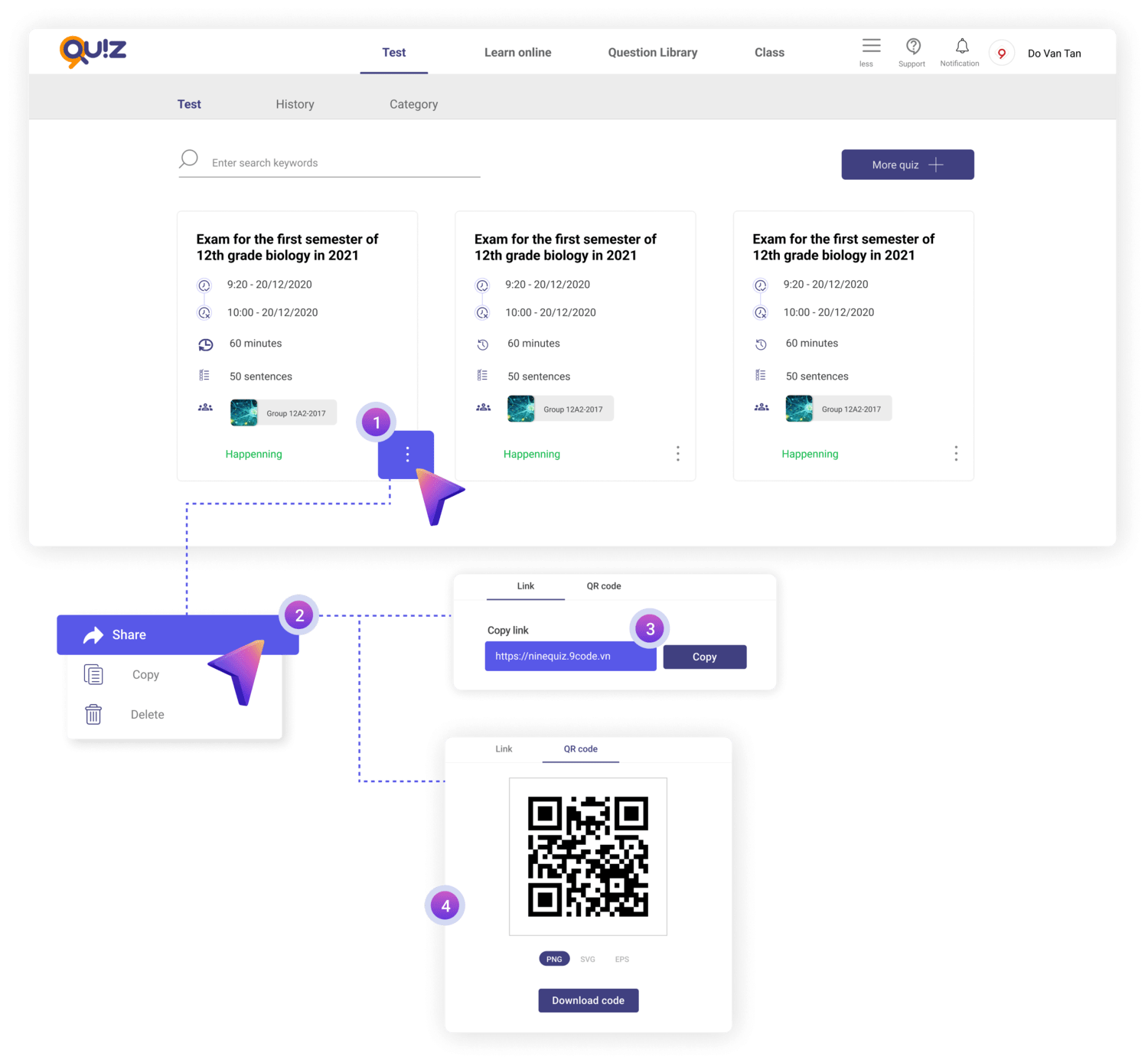
ຄຳຖາມທົດສອບເລືອກຄຳຕອບອອນໄລນ໌ຖືກອອກແບບຢ່າງຖືກຕ້ອງ
ຫຼາກຫຼາຍຮູບແບບຄຳຖາມ
ເມື່ອທຽບກັບວິທີການແບບດັ້ງເດີມ, ການສ້າງຄຳຖາມເລືອກຄຳຕອບອອນໄລນ໌ຊ່ວຍໃຫ້ທ່ານສາມາດຫຼາກຫຼາຍຮູບແບບຄຳຖາມໄດ້ໂດຍບໍ່ຕ້ອງເສຍແຮງຫຼາຍໃນການພິມຫຼືສັບສົນຄຳຖາມ. ຄຳຖາມເລືອກຄຳຕອບສາມາດແບ່ງອອກເປັນຫຼາຍປະເພດ: ເລືອກຄຳຕອບ "ຖືກ-ຜິດ", ຈັບຄູ່, ເຕີມຄຳຫາຍ, ຄຳຖາມພ້ອມຮູບພາບ ແລະອື່ນໆ. ເພື່ອໃຫ້ໄດ້ຄວາມຫຼາກຫຼາຍນີ້, ທ່ານຄວນໃສ່ໃຈສ້າງຄຳຖາມທີ່ຫຼາກຫຼາຍແລະເໝາະສົມກັບຈຸດປະສົງແລະຄວາມຕ້ອງການຂອງນັກຮຽນແລະຜູ້ສອບເສັງ.
ລະດັບຄວາມຍາກທີ່ເໝາະສົມ
ໃນການສ້າງຄຳຖາມເລືອກຄຳຕອບອອນໄລນ໌, ຄວນຮັກສາຄວາມສົມດຸນລະຫວ່າງຄຳຖາມງ່າຍ, ປານກາງ ແລະຍາກ. ຄວາມຫຼາກຫຼາຍຂອງຄຳຖາມຈະຊ່ວຍເພີ່ມຄວາມນ່າສົນໃຈ, ແລະການມີຄຳຖາມຈາກງ່າຍໄປຫາຍາກບໍ່ພຽງແຕ່ປະເມີນຄວາມສາມາດຂອງຜູ້ສອບເສັງແບບຮອບດ້ານເທົ່ານັ້ນ, ແຕ່ຍັງຊ່ວຍຫຼີກລ້ຽງຄວາມເບື່ອ, ກະຕຸ້ນຄວາມຄິດສ້າງສັນ ແລະສົ່ງເສີມການທຳຜົນງານໃຫ້ດີຂຶ້ນ.
ຫຼາຍຫຼາຍຂໍ້ຄວນສັງເກດໃນໂຄງສ້າງຂອງການທົດສອບ
ໃນການອອກແບບການທົດສອບ, ການແບ່ງລະດັບຄວາມຍາກຂອງຄຳຖາມແລະການປັບເວລາໃນການທົດສອບເປັນສິ່ງສຳຄັນຫຼາຍເພື່ອໃຫ້ເໝາະສົມກັບນັກຮຽນ. ຕົວຢ່າງ, ຖ້າຫ້ອງຮຽນມີນັກຮຽນທີ່ອ່ອນຫຼາຍ, ຄວນຈັດສັນຄຳຖາມງ່າຍ 70% ແລະຄຳຖາມຍາກ 30% ເພື່ອໃຫ້ເຂົາສາມາດທຳໄດ້ດີຂຶ້ນ. ສຳລັບການທົດສອບ 15 ນາທີ, ຈຳນວນຄຳຖາມຄວນຢູ່ປະມານ 13-15 ຄຳຖາມ; ສຳລັບການທົດສອບ 45 ນາທີ, ຄວນມີ 25-30 ຄຳຖາມ.
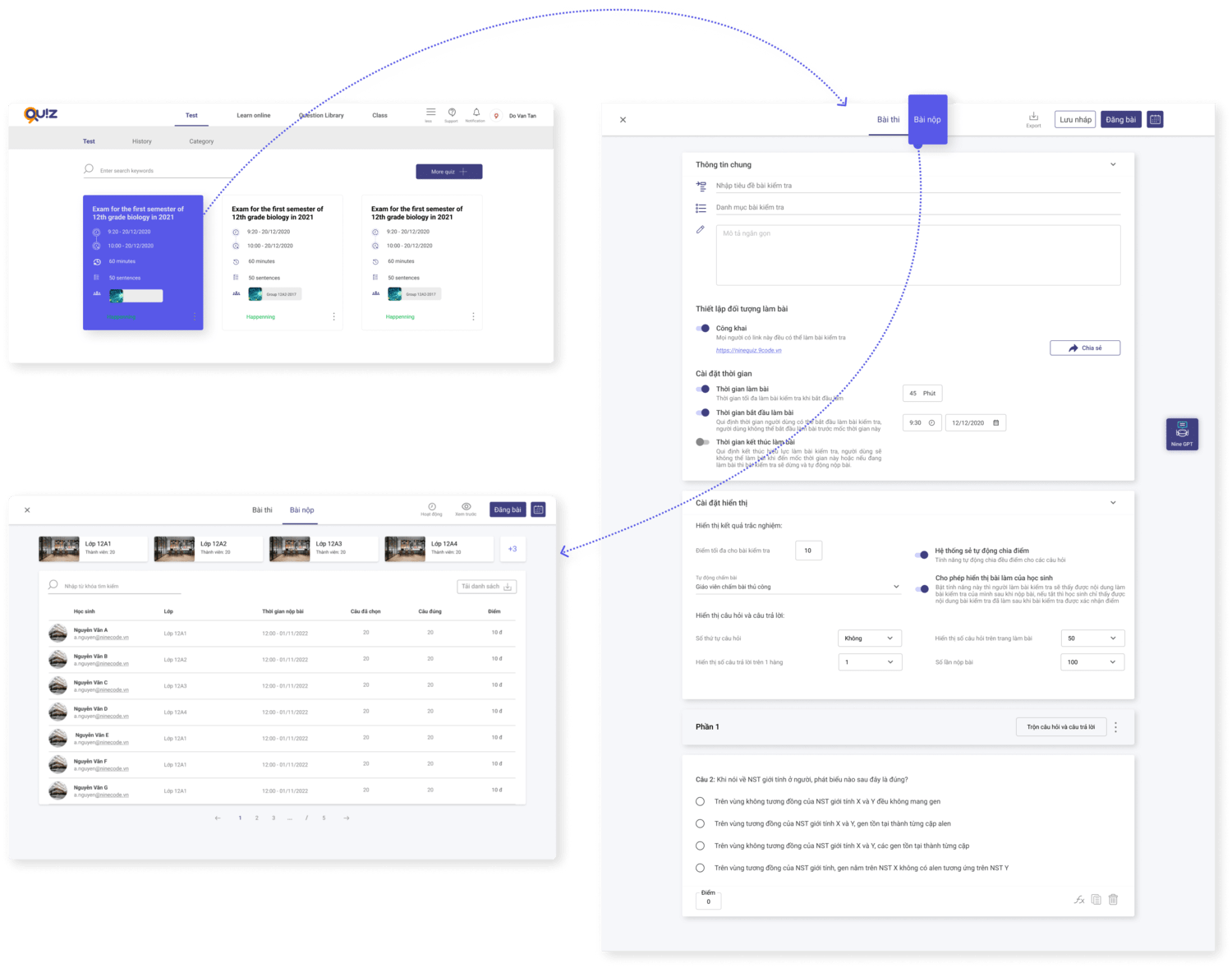
ໂຄງສ້າງຂອງການທົດສອບເລືອກຄຳຕອບອອນໄລນ໌ຕ້ອງຊັດເຈນແລະມີຂໍ້ມູນຄົບຖ້ວນ
ການຫຼາກຫຼາຍຄຳຖາມຕາມຫົວຂໍ້ຫຼືທັກສະຊ່ວຍໃຫ້ປະເມີນຄວາມສາມາດຂອງນັກຮຽນໄດ້ຮອບດ້ານ. ໃນຂະນະດຽວກັນ, ການຈັດຮູບແບບນີ້ຊ່ວຍໃຫ້ນັກຮຽນຕິດຕາມໄດ້ງ່າຍ ແລະຫຼີກລ້ຽງການເສຍສະມາທິເມື່ອພົບກັບການທົດສອບທີ່ຍາວເກີນໄປ. ນີ້ບໍ່ພຽງແຕ່ຊ່ວຍໃຫ້ຄູປະເມີນຄວາມສາມາດໄດ້ຖືກຕ້ອງ, ແຕ່ຍັງຊ່ວຍໃຫ້ນັກຮຽນສາມາດດຶງສະກັດຄວາມສາມາດຂອງຕົນເອງອອກມາໄດ້ສູງສຸດ.
ຫຼາຍຫຼາຍຂໍ້ຄວນສັງເກດໃນປະສົບການຂອງຜູ້ໃຊ້
ນອກເຫນືອຈາກປັດໃຈຂ້າງເທິງ, ໃນການສ້າງການທົດສອບເລືອກຄຳຕອບອອນໄລນ໌, ທ່ານຄວນໃສ່ໃຈຫຼາຍຫຼາຍປັດໃຈຕໍ່ໄປນີ້ເພື່ອໄດ້ຜົນລັບທີ່ດີທີ່ສຸດ:
- ອິນເຕີເຟດທີ່ໃຊ້ງານງ່າຍ: ໃຊ້ອິນເຕີເຟດທີ່ມີຄວາມເຂົ້າໃຈງ່າຍ, ອ່ານງ່າຍ ແລະໃຊ້ງານງ່າຍ. ນີ້ຊ່ວຍໃຫ້ຜູ້ໃຊ້ສາມາດໂຕ້ຕອບກັບການທົດສອບໄດ້ງ່າຍໂດຍບໍ່ມີອຸປະສັກ, ແລະຮັບປະກັນວ່າປຸ່ມນຳທາງມີຄວາມຊັດເຈນ ແລະງ່າຍຕໍ່ການເຂົ້າໃຈ. ເມື່ອຜູ້ໃຊ້ມີປະສົບການທີ່ດີ, ພວກເຂົາຈະມີແນວໂນ້ມທີ່ຈະສຳເລັດການທົດສອບໄດ້ຢ່າງດີ.
- ການກວດສອບຄວາມສົມພັນ: ຮັບປະກັນວ່າການທົດສອບເຮັດວຽກໄດ້ດີໃນອຸປະກອນແລະບຣາວເຊີຕ່າງໆ, ຈາກຄອມພິວເຕີຮອດໂທລະສັບມືຖື. ນີ້ເປັນສິ່ງສຳຄັນຫຼາຍເພື່ອບໍ່ໃຫ້ພາດຜູ້ໃຊ້ເນື່ອງຈາກບັນຫາທາງເທັກນິກ. ຄວນທົດສອບກ່ອນປ່ອຍໃຊ້ເພື່ອໃຫ້ແນ່ໃຈວ່າບໍ່ມີຂໍ້ຜິດພາດ, ຈຶ່ງສາມາດມອບປະສົບການທີ່ລື່ນໄຫຼແລະເປັນມືອາຊີບໃຫ້ຜູ້ໃຊ້.
ຫຼາຍຫຼາຍຂໍ້ຄວນສັງເກດໃນຄວາມປອດໄພແລະຄວາມປົກປ້ອງຂໍ້ມູນສ່ວນຕົວ
ຄວາມປອດໄພເປັນປັດໃຈສຳຄັນ, ໂດຍສະເພາະໃນການສອບເສັງໃຫຍ່ໆ, ເພື່ອປົກປ້ອງຂໍ້ມູນການທົດສອບຂອງຜູ້ໃຊ້.
- ອັນດັບທຳອິດ, ປົກປ້ອງຂໍ້ມູນຜູ້ໃຊ້ໂດຍໃຊ້ມາດຕະການຄວາມປອດໄພທີ່ແຂງແຮງເພື່ອຮັບປະກັນວ່າຂໍ້ມູນສ່ວນຕົວຂອງຜູ້ສອບເສັງຖືກນຳໃຊ້ສຳລັບຈຸດປະສົງທີ່ກຳນົດໄວ້ເທົ່ານັ້ນ.
- ອັນດັບສອງ, ກຳນົດສິດໃນການເຂົ້າເຖິງແລະແບ່ງປັນໃຫ້ຊັດເຈນ. ກຳນົດຜູ້ທີ່ມີສິດເຂົ້າເຖິງການທົດສອບແລະຜົນການທົດສອບ, ແລະຕັ້ງຄ່າຕົວເລືອກການແບ່ງປັນທີ່ປອດໄພເພື່ອປ້ອງກັນການນຳຂໍ້ມູນໄປໃຊ້ຜິດວັດຖຸປະສົງ.
ນອກຈາກນັ້ນ, ອິນເຕີເຟດທີ່ໃຊ້ງານງ່າຍກໍ່ມີບົດບາດສຳຄັນໃນຄວາມປອດໄພ. ອິນເຕີເຟດທີ່ເຂົ້າໃຈງ່າຍ, ອ່ານງ່າຍ ແລະໃຊ້ງານງ່າຍຊ່ວຍໃຫ້ຜູ້ໃຊ້ໃຊ້ງານການທົດສອບໄດ້ງ່າຍໂດຍບໍ່ສ້າງຄວາມສ່ຽງດ້ານຄວາມປອດໄພ. ສຸດທ້າຍ, ການກວດສອບຄວາມສົມພັນຊ່ວຍໃຫ້ການທົດສອບເຮັດວຽກໄດ້ດີໃນອຸປະກອນແລະບຣາວເຊີຕ່າງໆ, ຫຼີກລ້ຽງຂໍ້ຜິດພາດທາງເທັກນິກທີ່ອາດເຮັດໃຫ້ຂໍ້ມູນສູນເສຍ.
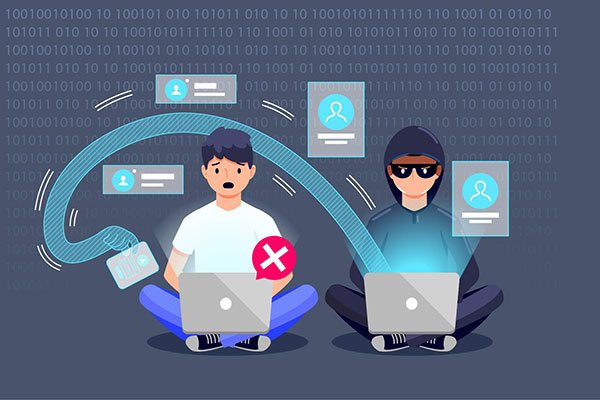
ຮັບປະກັນຄວາມປົກປ້ອງຂໍ້ມູນສ່ວນຕົວເມື່ອເຂົ້າຮ່ວມການທົດສອບເລືອກຄຳຕອບອອນໄລນ໌
ໂດຍສະຫຼຸບ, ໃນການສ້າງການທົດສອບເລືອກຄຳຕອບອອນໄລນ໌, ຄວນໃສ່ໃຈຕໍ່ປັດໃຈຕ່າງໆເຊັ່ນ ເນື້ອຫາທີ່ຊັດເຈນ, ໂຄງສ້າງທີ່ເໝາະສົມ, ປະສົບການຜູ້ໃຊ້ທີ່ດີ ແລະຄວາມປອດໄພຂໍ້ມູນ. ຂໍ້ຄວນສັງເ
ບົດຄວາມທີ່ກ່ຽວຂ້ອງ
