Ninequize is an educational software that integrates video call applications for online training, allowing teachers to share their lectures and interact directly with students at a time when the Ministry of Education is implementing online teaching plans instead of traditional in-person classes. Teachers can easily create meetings directly on Ninequize without having to open any other software.
Ninequize integrates popular online meeting software currently available (Zoom Cloud Meeting, Microsoft Teams, Google Meeting). Let’s explore these applications together.
Online Learning Software Zoom Cloud Meeting
In the past year, Zoom Cloud Meeting has emerged as one of the most widely used online teaching platforms. Therefore, if you are looking for online learning software, you definitely should not overlook Zoom Cloud Meeting. This software operates in a simple, easy-to-understand manner but offers many convenient features for users. At the same time, Zoom Cloud Meeting can run smoothly on various platforms and operating systems such as Mac, Windows, iOS, Android, etc.
Advantages of Zoom Cloud Meeting
- Zoom Cloud Meeting is free for everyone to use.
- The Zoom online learning software can host up to 50 participants per classroom (a fee is required for higher usage needs).
- Can be used effectively on both mobile phones and computers.
- You can invite friends to the room via Gmail.
- High-quality video and audio, with no interruptions during use.
Disadvantages of Zoom Cloud Meeting
- This software may encounter issues with the counter when running on older operating systems.
- Cloud meetings are only free for durations less than 40 minutes.
Online Learning Software Microsoft Teams
The Microsoft Teams online learning software has been extremely popular in the past year because it provides users with a multitude of valuable features. The chat, meeting, and notes systems in Microsoft Teams are highly beneficial for learning and information exchange between teachers and students. In addition, Microsoft Teams can also integrate with many other products and applications not released by Microsoft.
Advantages of Microsoft Teams
- Most tools are arranged in the same location, making it simple and efficient for users to operate.
- Microsoft Teams is completely free.
- All shared documents are saved. You can even retrieve this information months later or after deleting a channel.
Disadvantages of Microsoft Teams
- The biggest drawback of Microsoft Teams online learning software is the limited number of channels.
- Microsoft Teams lacks essential notifications for users.
- There are quite a few similar tools, which can clutter the user interface.
- Does not support grade or learning result management.
Google Meet Software
Google Meet is a tool that allows users to make video calls for individuals or groups. Google Meet users can connect online through web platforms integrated into Google’s G-suite such as Gmail or Google Calendar.
Advantages and Disadvantages of Google Meet
- Meetings can have up to 100 participants (free version).
- High video quality and strong security features.
- Allows quick and convenient sharing of screens, presentations, and documents.
- Allows recording of meetings and storage on the meeting creator’s Google Drive.
- Supports multi-platform participation.
- User-friendly interface, easy to use for basic operations.
- Supports English subtitles.
Disadvantages of Google Meet
- A fee is required for advanced services such as enhanced presentations, meeting recordings, and shared storage.
- No dedicated app for macOS and Windows, can only be used on PC via web browser.
- Cannot save chat messages from the meeting chat box if the meeting is not recorded.
Create Online Classes on Ninequiz
To create an online class with integrated video call, follow these steps:
- Step 1: Go to https://ninequiz.com
- Step 2: Log in with Gmail or a registered account
- Step 3: Select the teacher interface
- Step 4: Go to the "Online Learning" section and click "Add Schedule"
- Step 5: Enter the required information
- Title
- Time, date
- Select the format
- Add class
- Enable/disable auto-approval feature as needed
- Step 6: Click "Add" to complete
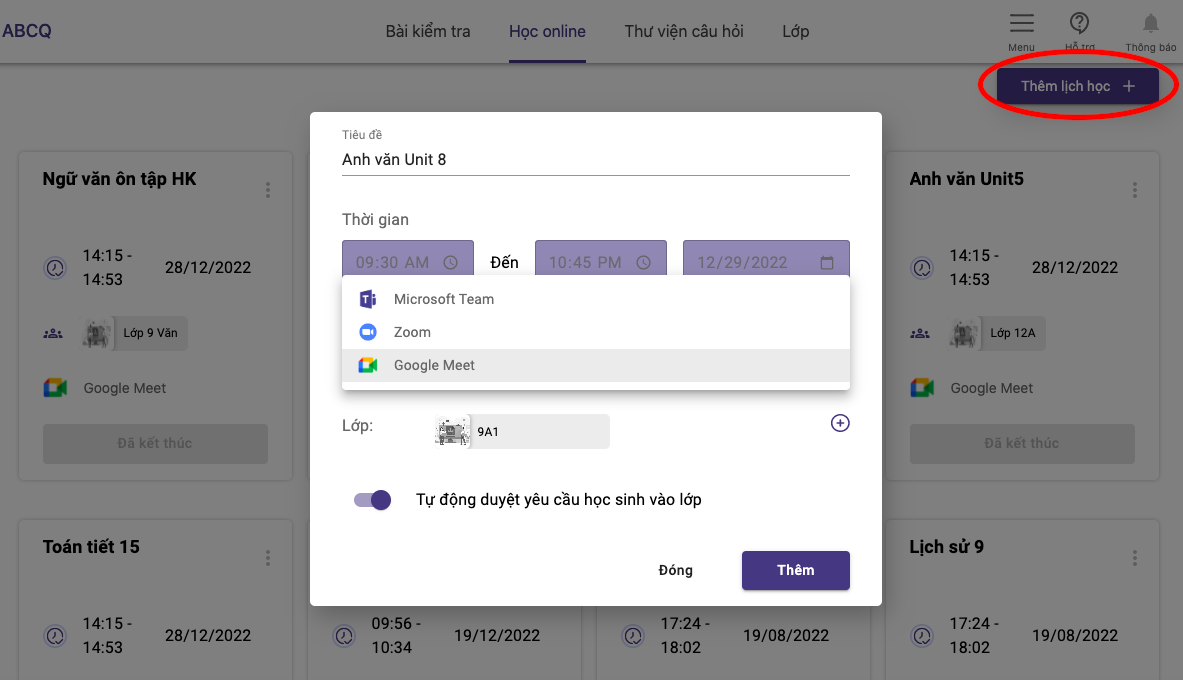
Integration of video call software on Ninequiz